Recently I decided to continue a quest 20-some-odd years in the making: to be the very best, like no one ever was. I jumped back into one of my all time favorite games, Pokemon Silver, to relive some mid-90’s nostalgia. After completing the game I was a bit frustrated with the absurd time consuming nature of the post game content. It was a perfect excuse to brush up on Python and create a Pokemon playing bot to do all the busy work for me.
Toward the end of the game, one of the main things left to do is train your Pokemon to max level, which involves spending countless hours defeating randomly encountered enemies. One way to speed this process up is to equip your Pokemon with a Lucky Egg, an item that multiplies experience gained in battle by 1.5. To get the Lucky Egg, it has a 3 in 200 chance to be held by a wild Pokemon, Chansey, which has a 1 in 100 chance of spawning. Sub-optimal odds to say the least.
Before writing any code, I decided to try to break everything down into various actions needed in order to obtain the item. For starters, using the Max Repel item eliminates all wild encounters under the level of your leading Pokemon for 250 steps. Moving up and left against a wall still triggers a random Pokemon encounter, but doesn’t waste any steps of the Max Repel. This isn’t a completly necessary to set up, but it removes unnecessary encounters, thus saving a fair bit of time in the process. I’d need to get the game in a state where a Max Repel is used, I’m in a field where a wild Chansey spawns, and my character is up against a wall in the grass.
Next, if a Pokemon that isn’t a Chansey is encountered, flee the battle, and continue moving in the grass. Otherwise, switch to a Pokemon that knows the move Thief which steals the opposing Pokemon’s held item, use the move, flee the battle, and stop the process if successful.
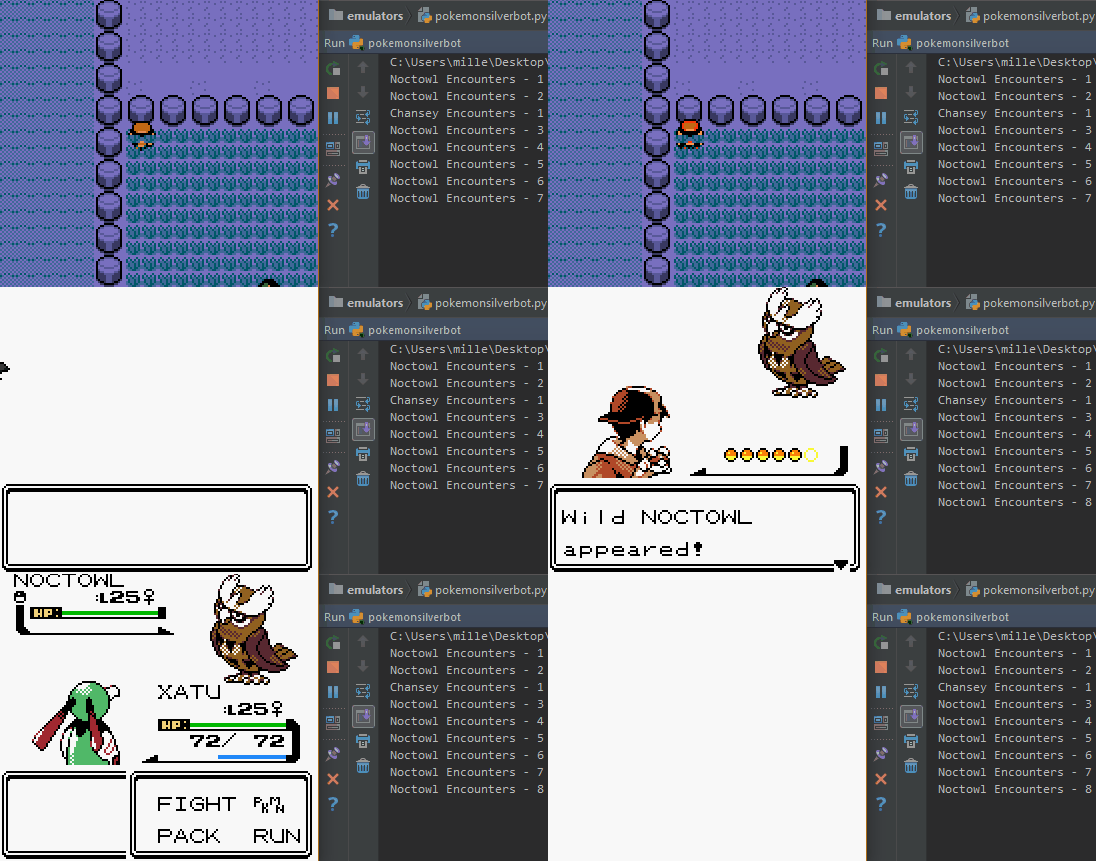
At this point, setting up some basic functions was pretty easy, and getting familiar with PyAutoGUI was fairly straight forward. The hardest part of the process at this point was figuring out the timing between the emulator loading and the script pressing the necessary button, but translating the button presses into various functions was easier than expected. OpenCV on the other hand turned out to be a bit more of a headache.
I quickly realized I’d need to have two different instances of Python running at the same time, one to take care of button presses, and one to process and compare images. Thankfully, this can be accomplished with Python’s multiprocessing package. Slowly but surely I was able to figure out how to take screenshots of the game with OpenCV, isolate different segments of the screen, save them, and use them to conditionally run different functions.
Once everything was up and running, after trying again an hour later, nothing would work. Welcome to the life of a developer. After a bit of troubleshooting and debugging, I learned that because I saved the screenshots as .jpg, I couldn’t compare the new image to the saved images of various Pokemon due to the way the file type uses compression. I would have to rewrite the code to save my images as .png files, and resave all the images the code was relying on. Finally, the Pokemon bot was a success, but more importantly, a consistent success.
After about 2+ hours and 200+ random encounters, the Lucky Egg was acquired. The emulator was sped up to 5x speed, so this 200 some odd lines of code saved me literally 10 hours of mindlessly walking into a wall.
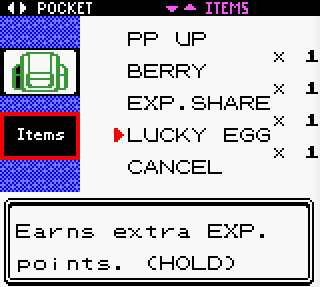
As it currently stands, the bot is programmed for a hyper specific use case, but now that it’s set up and working properly, it can definitely be expanded upon. Now that I have the Lucky Egg, the next logical step would be to write some functions to train Pokemon in an area of the game that maximizes EXP gained, which would again be as simple as translating some button presses into different functions. Eventually, it would be great to try to use some machine learning packages to teach the bot to play on its own, but that feels like it’s a long way down the line.
If you’d like to use this code yourself, check it out on my Github. I have included a save with the optimal conditions, but the only thing you’d have to do is set your VisualBoyAdvance size to 2x in the dropdown menu and put it in the exact location I coded. I’m assuming there’s an easier way to do this, but for now, you can verify you’re in the correct spot by checking the screenshot.png file and making sure the entire emulator is visible.
This project was inspired by Sentdex’s “Python Plays GTA V” series on YouTube and benefited greatly from prawigya’s Pokemon Shining Hunting Bot on Github.